Linear Regression
When working with bivariate data, not only can we get numerical and graphical summaries for the individual numerical variables, but we can get statistical summaries of them together.
Correlation
To calculate the correlation between two numerical variables, we will use the cor() function.
We will use the mtcars dataset in R. (first used on Numerical Data Summary page)
You can even get correlations for multiple pairs of numerical variables arranged in a matrix.
#no pec
        #Correlation between weight of car and miles per gallon.
        cor(mtcars$mpg, mtcars$wt)

        #Correlation between Iris petal length and petal width.
        cor(iris$Petal.Length, iris$Petal.Width)
cor() can only accept numerical input. Since the iris dataset has four numerical variables and one categorical variable, we need to subset the data (using [,] notation) before putting it into cor().
#no pec
        #This will only include the numerical variable columns
        #  iris[, 1:4]

        #Finding the correlation matrix
        cor(iris[, 1:4])
Scatterplots
To create a scatterplot between two numerical variables, we will use the plot() function. The first two arguments for plot() are the variables for the $x$ and $y$ axes, respectively. A few of the additional arguments for plot() are listed below along with their use:- main Using "", it provides the overall title for the plot.
- xlab Using "", it provides the label for the x-axis.
- ylab Using "", it provides the label for the y-axis.
- xlim Using c(), it changes the lower and upper limits of the x-axis.
- ylim Using c(), it changes the lower and upper limits of the y-axis.
- col Changes the colors of the plotting characters in the scatterplot.
- pch Changes the plotting character in the scatterplot (a number from 0 to 25). An image is shown below:
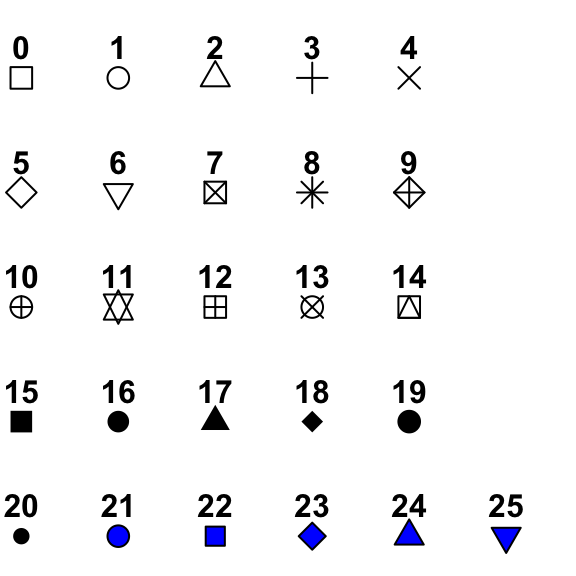
We will use the mtcars dataset in R.
#no pec
        #Basic Scatterplot
        plot(mtcars$wt, mtcars$mpg)

        #Customized Scatterplot
        plot(mtcars$wt, mtcars$mpg,
             main = "Cars from 1974",
             xlab = "Weight (1000 lbs)",
             ylab = "Miles per gallon (mpg)",
             xlim = c(0, 6),
             ylim = c(0, 40),
             pch = 19,
             col = "chocolate")
You can even get scatterplots for multiple pairs of numerical variables arranged in a matrix using the pairs() function.
pairs() can only accept numerical input. Since the iris dataset has four numerical variables and one categorical variable, we need to subset the data (using [,] notation) before putting it into pairs().
#no pec
        #This will only include the numerical variable columns
        #  iris[, 1:4]

        #Creating the scatterplot matrix
        pairs(iris[, 1:4])
Video Tutorial:
Least Squares Line
To calculate the least squares regression line for two numerical variables, we will use the lm() function, which stands for "linear model". Using '~' notation, we will input our variables with the dependent variable, $y$, first with the explantory variable, $x$, after the '~'.
We will use the mtcars dataset in R. Miles per gallon (mpg) will be our dependent variable, $y$, and weight (wt) will be our explanatory variable, $x$.
The lm() function will return the intercept and slope coefficient for the least squares regression line. For this example, the $y$-intercept is 37.285 and the slope is -5.344. The least squares line would look like this:
$$y = 37.285 - 5.344x$$
where $x$ is the weight (wt) variable and $y$ is the miles per gallon (mpg) variable.
For more detailed information on the linear model, you can use the summary() function.
#no pec
lm(mtcars$mpg ~ mtcars$wt)
#no pec
summary(lm(mtcars$mpg ~ mtcars$wt))
Plotting the Least Squares Line
After creating your scatterplot, you can add the least squares regression line to your plot using the abline() function. You can either specify the intercept and slope values explicitly or just nest lm() inside of abline().#no pec
          plot(mtcars$wt, mtcars$mpg,
             main = "Cars from 1974",
             xlab = "Weight (1000 lbs)",
             ylab = "Miles per gallon (mpg)",
             xlim = c(0, 6),
             ylim = c(0, 40),
             pch = 19,
             col = "chocolate")

          #Explicitly, 'a' is intercept, 'b' is slope
          abline(a = 37.285, b = -5.344)

          #Using lm()
          abline(lm(mtcars$mpg ~ mtcars$wt))