Phish Bowl fishing rod
Phishing is a form of cybercrime where attackers pose as legitimate entities, such as universities, businesses, or coworkers, to trick individuals into sharing sensitive information like login credentials or financial details. These scams are delivered through emails, text messages, phone calls, and even social media.
The term comes from "fishing," where bait is used to lure a victim. In phishing, the bait is a fake message, attachment, or link meant to get you to take the bait often by clicking or replying.
Stay Safe
Be proactive by enabling Microsoft multi-factor authentication (MFA), following safe internet practices, using USU's Wi-Fi or virtual private network (VPN), and regularly updating passwords. Consider completing the Phishing Training Course.
Phishing Awareness & Prevention
Reporting
Report suspected phishing emails using the built-in reporting buttons in Outlook.

Why It Matters
Phishing is one of the most common cyber threats. Research shows that over 94% of malware is delivered via email, making phishing a leading cause of data breaches and compromised accounts. While filters and security tools help, every individual must stay alert to stop phishing in its tracks.
How to Spot a Phish
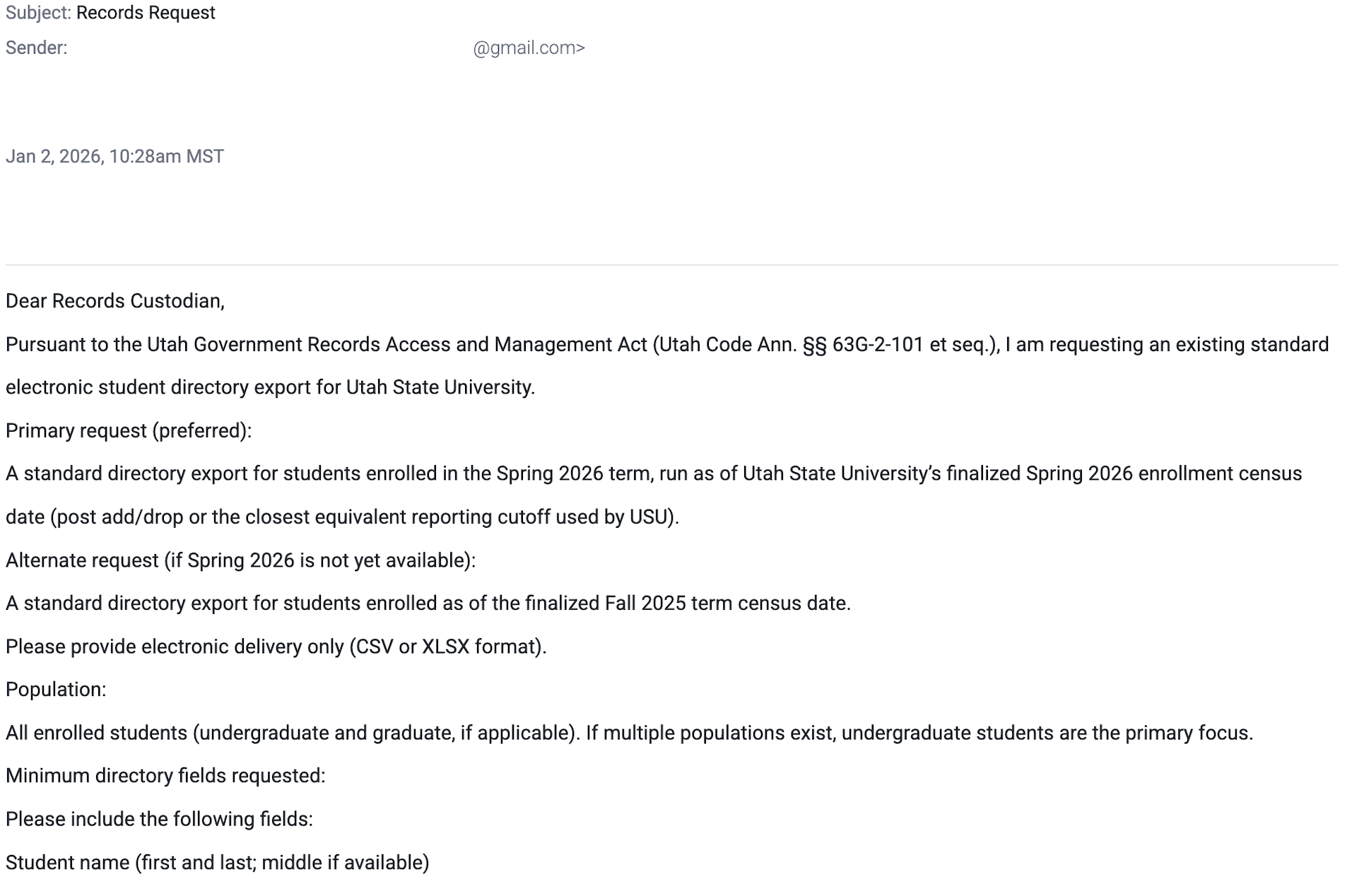
- Suspicious Senders: Check the sender's email address. If it's unfamiliar, misspelled, or from a free domain like @gmail.com when it should be from @usu.edu, proceed with caution.
- Generic or Odd Language: Phishing emails often use vague greetings like "Dear user," have mismatched subject lines, or include poor grammar and sentence structure.
- Unexpected Requests: Be skeptical of emails asking for personal information, login details, or payment. Legitimate organizations rarely ask for this unsolicited.
- Urgency and Threats: Scare tactics like "Your account will be suspended" or "Immediate action required" are common. These are designed to bypass your better judgment.
- Suspicious Links or Attachments: Always hover over links to verify their destination before clicking. Be wary of attachments you weren't expecting even if they look official.
Common Tactics at USU
- Fake Job Offers: Promising easy money while asking for personal or banking info.
- Estate Sales: Scammers advertise high-value items like antiques, furniture, or electronics at steep discounts or even free, often claiming the sale is due to a recent inheritance or urgent relocation.
- Impersonation of Staff: Messages pretending to be from university leadership or professors.
- Account Alerts: Claims your account will be disabled unless you click a link.
- Malicious Attachments: Files disguised as resumes, invoices, or shared docs.
- File Share Scams: Real-looking platforms (like Sharepoint and Google Drive) with malicious links inside the files.
Best Practices
- Pause before you click. Hover to preview links and ensure they go where they say they do.
- Verify the source. When in doubt, contact the sender directly using a known method not by replying to the suspicious message.
- Limit what you share online. Attackers use social media and public info to personalize their scams.
- Educate others. Share what you know, security is everyone's responsibility.
Types of Phishing Attacks
- Spear Phishing: Targeted attacks using personal information to appear legitimate.
- Vishing: Voice scams using fake caller IDs to pressure victims.
- Whaling: Attacks targeting high-level executives with tailored messages.
- Smishing: Text-based phishing asking for urgent action.
- Clone Phishing: Re-sending altered versions of legitimate emails with harmful links or attachments.

Recent Attempts