
Faculty FAQs
Evaluation Period & Schedules
Why is there a designated IDEA evaluation period?
IDEA evaluations are typically available during the final two to three weeks of the semester and end on the final day of class before finals. By this point, students have had enough experience in the course to provide informed feedback.
The evaluation period ends before the final because although the final is certainly part of the course experience, responses collected afterward can sometimes be influenced more by students’ feelings about a single exam than by their overall experience throughout the semester.
We also try to avoid extending evaluations beyond the end of the course. This is to avoid going past the grade submission deadline as it is preferred to receive student feedback before final grades are known, since grades can have a significant impact on how students respond to an evaluation.
Using a standard evaluation period across the university helps ensure consistency and allows the process to be managed efficiently, including course setup, communication/reminder emails, and report generation.
Does my course evaluation have to follow the designated evaluation schedule?
Faculty are expected to use the designated IDEA evaluation schedule whenever possible. Following a common schedule provides a consistent experience for students and instructors and supports the efficient administration of evaluations across the institution.
We recognize that there are circumstances in which custom evaluation schedules may be necessary. Requests for alternative schedules can be accommodated when appropriate; however, the standard schedule remains the expectation.
Courses that use a custom evaluation schedule, particularly those with an evaluation period that extends beyond the standard end-of-semester timeline, will be excluded from our automatic Canvas assignment creation process. Those who offer participation credit for completing course evaluations in these courses, will need to create and manage the Canvas assignments manually.
Selecting IDEA Objectives
How many Objectives should I select?
Although each of the 13 IDEA objectives is desirable in the abstract, it is unrealistic to think that, in a single course, students can make significant progress on all, or even most, of them. Most instructors will be unable to seriously address more than three to five objectives. Those choosing more than five objectives commonly spread their efforts too thinly to impact student learning significantly in all areas. IDEA recommends that a total of 3-5 objectives is a good rule of thumb. You can select them as either "important," or "essential," with essential objectives double weighed (counting twice) in the calculation of your averages. Both important and essential objectives should be counted towards your overall total (e.g. pick 3-5, not 6-10). The best approach to selecting objectives is to ask three questions:
- Is this a significant part of the course?
- Do I do something specific to help students accomplish this objective?
- Does the student's progress on this objective affect his or her grade?
If you can answer "yes" to all three questions for a particular objective, it should be selected as either "important" or "essential."
Faculty should be "true to their course" when deciding how many objectives to select. In other words, if you are teaching a lab course where only one objective seems appropriate, then just select one. If you are teaching a senior capstone class for the major, and you feel you should select more than five, then feel free to do so. Be true to your course.
The selection of objectives is a crucial activity for two reasons. First, the IDEA System evaluates teaching by assessing student progress on these unique, instructor-chosen objectives. Second, objectives provide guidance for selecting teaching methods; those that promote progress on one type of objective may differ from those that promote progress on other types. Differential objectives make each course a unique learning experience.
Although objectives can be stated in a variety of ways, they should always focus on expected effects on students, not on the instructor's actions or procedures designed to promote learning. It is desirable for each instructor to develop statements or objectives as precisely and comprehensively as possible. To participate effectively in the IDEA program, it will be necessary to interpret these statements within the framework provided by the 13 objectives listed. The following discussion is intended to help users differentiate meaningfully and accurately among the 13 objectives of the IDEA System.
What is meant by each IDEA Objective?
The 13 IDEA objectives have been developed over a period of 30 years, both through literature reviews and by consulting faculty who have used the IDEA system. The intent is to provide a useful, practical way to describe the objectives of most college courses.
IDEA Objectives click to for additional details...
- Gaining a basic understanding of the subject (e.g., factual knowledge, methods, principles, generalizations, theories)
- Developing knowledge and understanding of diverse perspectives, global awareness, or other cultures
- Learning to Apply Course Material (to improve thinking, problem solving, and decisions)
- Developing specific skills, competencies, and points of view needed by professionals in the field most closely related to this course
- Acquiring skills in working with others as a member of a team
- Developing creative capacities (inventing, designing, writing, performing in art, music, drama, etc.)
- Gaining a broader understanding and appreciation of intellectual/cultural activity
- Developing skill in expressing myself orally or in writing
- Learning how to find, evaluate, and use resources to explore a topic in depth
- Developing ethical reasoning and/or ethical decision making
- Learning to analyze and critically evaluate ideas, arguments, and points of view
- Learning to apply knowledge and skills to benefit others or serve the public good
- Learning appropriate methods for collecting, analyzing, and interpreting numerical information
Frequently, there are differences between the instructor's and the students' perception of the relevance of a given objective. It is recommended that the course objectives be discussed with the students, preferably early in the term.
Ask them to reflect on their understanding of the course's purposes and the way in which they believe the various parts of the course fit into each of the 13 objectives. Student learning will be enhanced if they are committed to clearly formulated objectives. It may also be helpful to add the objectives to the course syllabus. This link on Integrating IDEA Objectives into a Course Syllabus gives some examples of how to do so.
Based on interviews with a small number of students, we do not believe that holding such a discussion before the students fill out the IDEA Response Form will bias results. Students claim that their report of progress on objectives is uninfluenced by the knowledge that the instructor selected the objective as relevant. However, progress is more likely if students and faculty agree on the major purposes of the course. Hence, a discussion of such purposes will not only improve the quality of responses to the IDEA form but also be beneficial to the learning process.
How do I complete Objective Selections?
To complete the Objective Selection Form (OSF) start by logging into the faculty portal. From the Home page you can navigate to the OSF Manager tab at the top or click on Objective Selection Form, to the right of each course.
Once in the OSF, select the objectives chosen as either “important” or “essential” and save them. This will need to be completed for all courses every semester. This link on how to complete objective selections contains more details and helpful images.
All faculty teaching courses set up for evaluation will receive email reminders throughout the semester regarding their course objectives. These objectives are then used for student responses.
IDEA Evaluation Tools
What is the difference between the IDEA Diagnostic Feedback and IDEA Learning Essentials tools?
IDEA’s Instruments provide feedback you can use to improve instruction with the focus of the instrument on student learning. The student ratings provide evidence of progress on learning objectives and teaching methods used in a course. One of the most important of the pieces of evidence is student ratings of how well they achieved learning objectives in your course. Students are asked to rate their achievement of learning objectives in both the comprehensive Diagnostic Feedback instrument and Learning Essentials instrument. In your report, you will be able to see their rating and how you compare to other groups.
Diagnostic Feedback Instrument
A comprehensive tool that provides the following:
- Both summative and formative feedback about student progress on relevant course objectives
- Instructor teaching methods
- Overall impressions of the instructor and course
- 40 questions
Learning Essentials Instrument
Provides the following:
- Summative feedback about average student progress on relevant learning objectives
- Overall impressions of the instructor and course
- 18 questions
Note the main differences between the two, the Diagnostic Feedback tool includes formative feedback and instructor teaching methods, whereas the Learning Essentials tool does not. The Diagnostic Feedback tool also contains more than double the number of questions.
How do I choose which IDEA tool to use?
The selection of which tool to use depends on your department and is decided to meet desired goals for faculty improvement of instruction. Some departments may elect to use only one of the tools for all courses, and others might use either of the tools. Also, depending on department policies, some may allow faculty to choose the instrument they would like to use for particular courses, and others may make the decision for faculty.
Keeping in mind the main differences between the two, specifically the number of questions, many departments choose to use the Learning essentials tool. This is primarily to reduce the number of survey items students must respond to each term. You can discuss any questions you have about this within your department.
Your department Setup Admin selects the tool when setting up the evaluations. If your department allows faculty to choose, you should contact your Setup Admin to inform them of your selection so that they can be set up accordingly. We also recommend you reach out to them if you have additional questions.
IDEA Evaluation Custom Questions
Instructor added custom questions allow instructors to add questions to the evaluation for a specific course section. The questions appear at the very end of the evaluation and may only be added up until the evaluation opens. Department setup admins designate permissions to allow instructors to add additional questions, and they are instructed to always turn this feature on.
How do I add custom questions to my evaluations?
To add custom questions, start by logging into your faculty portal. At the top of the page you will click Course Evaluation Questions. From this page you will see the option to click View/Edit Evaluation to add your questions, or View Evaluation if the feature is not enabled or evaluations have already opened. Once you click View/Edit Evaluation, on the left you will see the questions that are currently on the evaluation and on the right the option to Edit next to Custom Questions. After clicking Edit, you will see options to add your questions.
This page on Adding Custom Questions to a Course Section as an Instructor takes you step by step with helpful images.
Response Rates
The higher the response rates, the more valid and representative the ratings are. Instructors should aim for response rates higher than 70%. Courses with smaller class sizes should have a goal of 100% response rate.
It is important to note that there is an institution-wide threshold feature that is enabled by default to allow for restricting access to reports if a section does not receive 3 or more responses, or 100% for courses with only 2-3 students. This threshold is in place to ensure confidentiality and limit individual identification, as well as to ensure statistical validity and data quality.
What can I do to increase response rates?
There are many ways to increase response rates. By integrating IDEA into your course and discussing it with students, communicating the value of the evaluations and how you use the responses, and by creating incentives for students.
Adding an objective course map to your syllabus allows students to see exactly what is expected. There is also the option of creating an assignment in Canvas, it can be created as a regular assignment that is part of their grade, or as extra credit to reward them for taking the time to complete it. Another major way to increase your response rates is by giving students time during class to complete it when possible. This QR Code can be displayed in class, it directs students to their evaluations and works for all courses in every semester.
Students are more likely to complete the evaluations when they know their importance. Communicate what changes you have made and how responses have adjusted your teaching. Remind students that this is not “Rate my Professor,” their responses are important for improving courses and the effectiveness of instruction, and they are used to make formative decisions.
Along with creating an assignment for extra credit as an incentive, you can set a goal for response rate and reward the class if they meet or exceed the threshold.
Understanding IDEA Reports/Scores & How to Access Them
How do I access my reports?
To access your course evaluation reports, log in to the faculty portal. After logging in, you will be brought to the dashboard which defaults to the most current term in which you have a course section.
Summary reports are available under ‘Course Evaluations Summary Report’. To view individual reports, under ‘My Courses’, click ‘View Results’ for the course that you would like to view.
*Keep in mind, if reports have not been released, you will not see the View Results button.
The Quantitative tab shows a summary of all responses with a frequency distribution, mean, standard deviation, and count of responses. The Qualitative tab has a summary of all open-ended questions applicable for the course.
More in depth information can be found on this Faculty Reporting Guide page.
As a reminder, reports are not generated for any courses with less than 3 responses.
What are the different tabs/sections of the IDEA Report?
Summative
The Summative section provides an overall view of student perceptions of the course and instructor. It includes ratings related to overall teaching effectiveness, course quality, and student learning outcomes. This section is commonly used for broad evaluation and comparison purposes.
Formative (for Diagnostic Tool only)
The Formative section is intended to support instructional improvement. It provides more detailed feedback on teaching practices and classroom experiences, helping instructors identify strengths and areas for development. These results are most useful for reflection, course revision, and professional growth.
Quantitative
The Quantitative section contains the numerical results from student responses, including averages, adjusted scores, progress ratings, and comparison scores. This section allows instructors and reviewers to examine patterns and trends in the data.
Qualitative
The Qualitative section includes students’ written comments and open-ended feedback. These comments can provide important context for the numerical ratings and may highlight specific strengths, challenges, or suggestions. Faculty are encouraged to look for recurring themes rather than focusing on isolated comments.
How do I interpret my results?
When looking at your results, start with a review of the response rate. The higher the response rate, the better. A higher response rate provides more comprehensive insights and increases the validity and reliability of your scores. IDEA student ratings should be interpreted as one source of evidence about teaching effectiveness, alongside peer review, self-reflection, course materials, and evidence of student learning.
When reviewing results:
- Focus on overall patterns and trends rather than a single score or semester.
- Consider whether selected learning objectives are aligned with course priorities.
- Look for recurring themes in student comments rather than isolated remarks.
- Use results to identify strengths and opportunities for improvement over time.
Small differences in scores are often not meaningful on their own, and student ratings can be influenced by factors beyond instructor control.
What are adjusted scores?
IDEA adjusted scores are designed to account for factors that may influence student ratings but are not directly related to teaching effectiveness. These include class size, student motivation, student effort/work habits, course difficulty, and student background preparation.
Adjusted scores provide a more context-sensitive estimate of teaching effectiveness and are generally more appropriate for comparisons across courses or instructors than raw averages alone.
What are Progress on Relevant Objectives ratings?
Progress on Relevant Objectives ratings reflect students’ perceptions of how much progress they made on the learning objectives selected for the course.
These ratings are most meaningful when:
- The selected objectives accurately reflect the course’s primary goals
- Students had sufficient opportunity to engage with those objectives
- Results are interpreted alongside course context and instructional methods (for example, specific assignments that may be mapped to the selected objective)
Higher progress ratings suggest students perceived meaningful learning gains in the targeted areas.
What are Ratings of Summative Questions?
The Ratings of Summative Questions section reflects students’ overall perceptions of the course and instructor. These items are often used as broad indicators of instructional effectiveness and include measures such as:
- Excellent teacher
- Excellent course
- Gained factual knowledge
- Learned to apply course material
- Developed skills and competencies
These ratings should be interpreted cautiously and within context. Although IDEA adjusts for some factors outside the instructors control, student perceptions may be influenced by other factors such as course level, grading practices, or whether the course is required or elective.
What is the Converted Average Comparison Score?
The Converted Average Comparison Score is IDEA’s standardized score used to compare results across courses, instructors, and institutions. Rather than reporting only the raw average from student responses, IDEA converts results to a common scale centered around a national average.
IDEA typically reports these scores on a scale where:
- 37 or less represents the lowest 10%
- 44 or less represents the lower 30%
- 45-55 represents the middle 40%
- 56 or higher represents the higher 30%
- 63 or higher represents the highest 10%
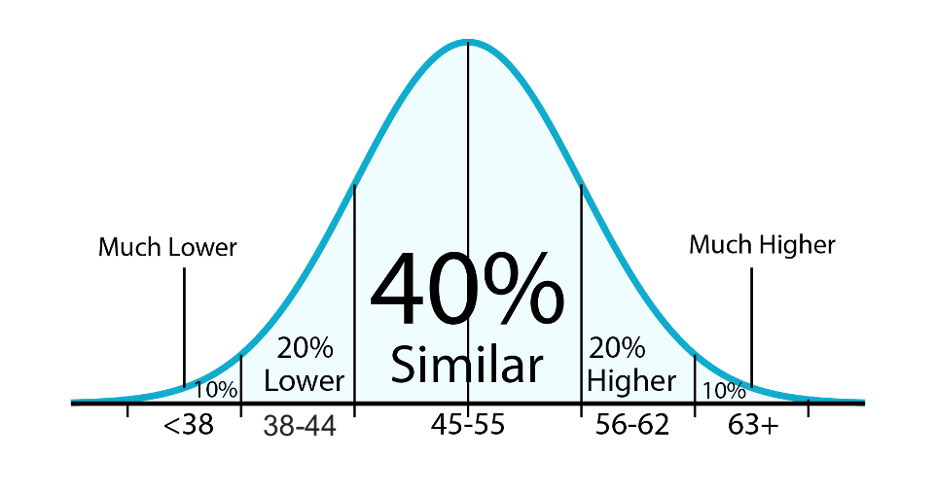
The converted score is not a percentage or letter grade. Instead, it is a standardized comparison score intended to provide context for interpreting results.
How is the Converted Average Comparison Score calculated?
IDEA first calculates the average student rating for an item or scale based on survey responses. That average is then statistically converted using IDEA’s national database so that scores can be compared more consistently across different courses and instructional settings.
The conversion process:
- Places scores on a standardized scale
- Adjusts for differences in response distributions
- Allows comparisons across courses and institutions
- Helps interpret results relative to national norms
In many IDEA reports, converted scores may also be presented as adjusted converted scores, which incorporate IDEA’s adjustment process for factors such as student motivation, class size, or course characteristics.
Rather than focusing on a single item or semester, faculty are encouraged to look for patterns across time and across related measures.