
Log in to Essential USU Systems
MyUSU is our university one-stop portal with access to most employment-related systems, services, announcements, etc. To sign in:
- Go to your MyUSU dashboard
- Use your A-number as your username
- Type in your strong password
- Approve request using one of the Microsoft Authenticator options (MFA)
- Enter the code sent to your device and you're in!
As a USU employee you will receive a Microsoft Outlook email account for all work-related emails. To sign in to your email:
- Go to MyUSU
- Use your A-number (USU ID) in the format anumber@aggies.usu.edu for the username
- Type in your strong password under "enter password"
- Approve request using one of the Microsoft Authenticator options (MFA)
- Enter the code sent to your device and you're in!
- MyTime - Used by benefit-eligible employees except Logan Facilities Services employees. Only non-exempt benefit-eligible employees clock their work hours, while all benefit-eligible employees submit leave requests.
- Aggie Time - Used by non-benefit eligible employees (except Logan Facilities Services employees—see below) to clock their work hours.
- AiM Assetworks (Logan Facilities) - Used by Logan Facilities Services employees for tracking work hours, as well as managing work requests and maintenance orders.
Learn Blue is USU’s employee learning management system. It provides access to required trainings, as well as leadership and employee development courses, certifications, and other professional growth opportunities.
As a new employee, you will be automatically enrolled in several training courses in Learn Blue (including new employee orientation) based on your specific role. These courses must be completed within your first 30 workdays. You will receive enrollment notifications via email from noreply@myabsorb.com.
- Go to your MyUSU dashboard
- Click on the Common Tools dropdown menu
- Select MyID, then login
- Review your profile and contact information
- Make sure your personal information stays accurate. Revisit MyID and update it anytime your contact details change.
- In the MyID menu, click Phone Numbers on the left-hand side
- Add or edit mobile numbers you would like USU to use for text alerts
- Click Email Addresses on the left-hand menu
- Confirm your preferred email address is correct
MyID lets you manage your personal and account information at USU. You can update details such as your address and phone number, set or reset challenge questions, and choose how you’d like to receive emergency Aggie Alerts (via text or email).
How to Receive Email and Text Alerts for Campus Safety

Get Your USU ID Card
Your USU ID card can be used to get into recreation facilities such as the HPER and Fieldhouse (lower level) and the Library. You can also add meal plans, dining dollars, and receive discounts for the Campus Store and Dining Locations.
Benefited employees will receive their card at New Blue Employee Orientation.
Logan Campus non-benefit eligible employees can visit the USU ID Card Office located in the Taggart Student Center (TSC) room 212.
Price campus employees can pay for their card at the One Stop Student Services building and pick-up their card from the Library & Learning Commons with their receipt and proper identification.
Week 1 Onboarding Checklist
To help ensure a smooth transition into the USU community, you and your supervisor will use this checklist during your first week to cover key topics and resources essential to your success. Once completed, both you and your supervisor will sign the checklist, and you will upload it into your onboarding curriculum in Learn Blue, or email it to training@usu.edu.
This checklist is a critical part of your onboarding process, designed to help you feel informed and supported as you begin your journey with us. If you need any assistance along the way, feel free to reach out to your supervisor, department business services representative, or Human Resources. We’re here to help!
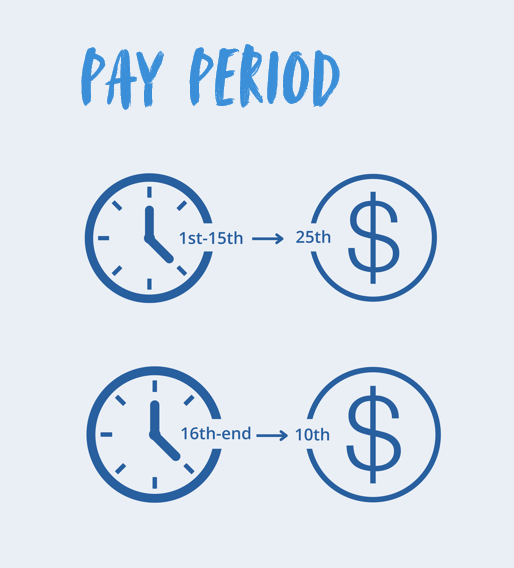
Know When You'll Get Paid
If your start date falls between the 1st and the 15th, your first paycheck will be the following 25th. If your start date falls between the 16th and the end of the month, your first paycheck will be the following 10th.
Note: If the 10th or 25th falls on a weekend or holiday, deposits will be made on the previous business day.
Set up direct deposit by following the instructions from the Payroll team.

Remember to take your Breaks!
15-Minute Breaks
All employees should take a duty-free, 15-minute break for every four hours that they work. Non-exempt employees do not need to clock out during these breaks.
Lunch Breaks
All full-time employees should take duty-free lunch breaks of 30-60 minutes each day they work. Non-exempt employees must clock out during this time.