Utah State University sites use cookies. By continuing to use this site you accept our privacy and cookie policy.
Skip to content
  • Apply
  • Visit
  • Give
  • Calendar
  • A-Z Index
  • Directory
  • Libraries
  • QUICK LINKS
  • MyUSU
  • SEARCH
Utah State University logo
Academic Support

Search Utah State University:

I want to search
UState logo
Academic Support
  • Home
  • Technology Support
    Technology Support
    • IT Service Desk
    • Canvas
    • Kaltura (MyMedia)
    • Zoom
    • Other Technology
  • Learning Tools
    Learning Tools
    • Communication
    • Reading Comprehension
    • Setting Up Your Space
    • Stress Management
    • Study Habits & Success
    • Taking Notes
    • Taking Tests
    • Time Management
  • Learning Supports
    Learning Supports
    • Aggie First Scholars
    • Disability Resource Center
    • Habits of Mind & Introductory Courses
    • SSS TRIO
    • Supplemental Instruction (SI)
    • Tutoring
    • USU Libraries
    • Writing Center
  • Quick Links
    Quick Links
    • Apply
    • Visit
    • Give
    • Calendar
    • A-Z Index
    • Directory
    • Libraries
  • MyUSU
Canvas Support
  • Instructure Canvas Guides
    • Full Student Guide
    • Add To-Do Item in List View Dashboard
    • Adding a Profile Picture
    • Contacting Canvas Group
    • Finding Peer Review Feeback
    • How to Use the Course Syllabus
    • Replying to a Discussion
    • Submitting a File
    • Submitting a Google Doc
    • Submitting a Peer Review
    • Submitting a Text Entry Assignment
    • Using the Canvas Inbox
    • Using the Dashboard
    • Using the To-Do List and Sidebar
    • Using the To-Do List in List View Dashboard
    • View Announcements
    • View Assignments
    • View Assignment Feedback
    • View Grades
    • View My Groups
    • View Rubric Results
  • Overview
  • Allow Third-Party Cookies to Load Tools in Canvas
  • Atomic Search
  • Early Access to Your Course
  • Embed Image in a Canvas Discussion
  • Flip Video Response
  • Initial Discussion Post
  • Navigating Canvas Courses
  • Notification Preferences
  • Searching and Filtering Discussions
  • Student Calendar
  • Submitting Google Assignments

Search and Filter a Canvas Discussion

Use the search box to find specific words within posts or replies written by specific people.

discussion search box with option to search entries or author

The button with the icon where the arrow points up will allow you to collapse the discussions. This is helpful to navigate quickly through discussion posts.
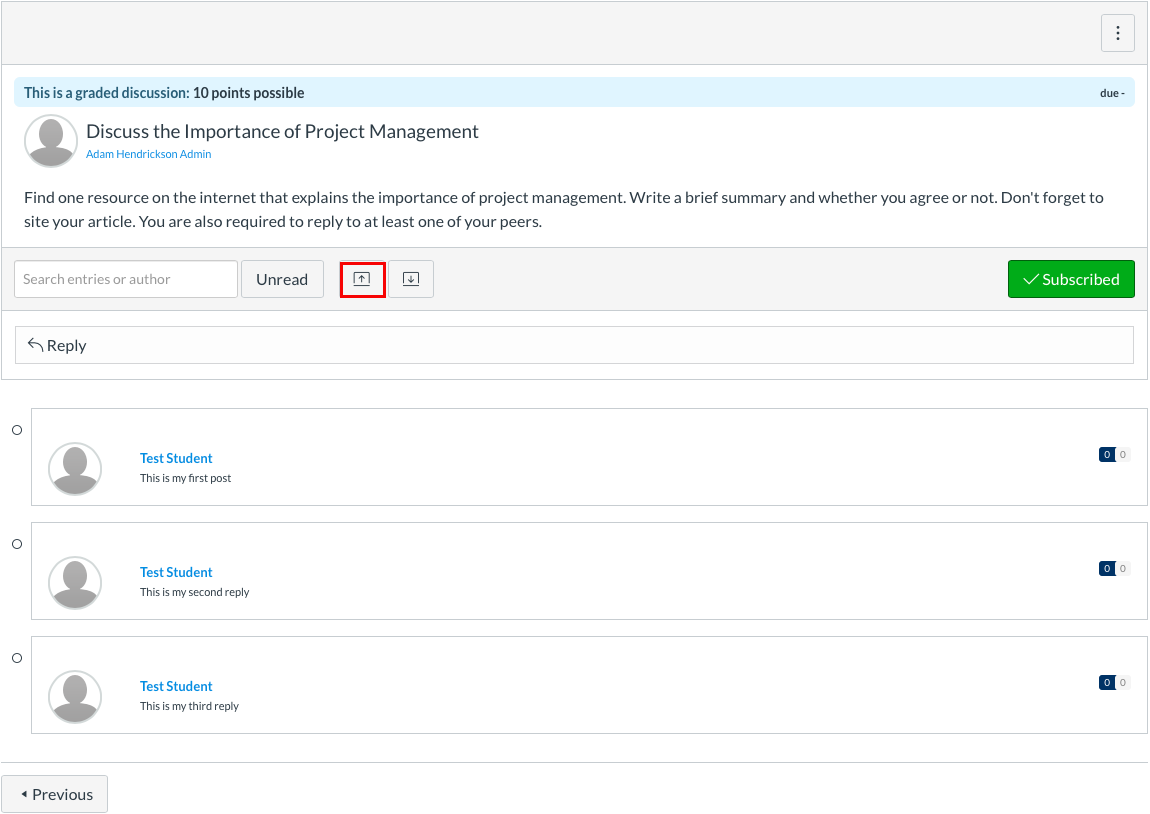
collapse discussion posts in canvas

The button with the icon where the arrow points down allows you to expand posts.

expand discussion post button


Utah State University
  • Maps & Directions
  • Search USU
  • Campus Safety
  • Jobs
  • Contact
  • Terms of Use
  • Copyright
  • Privacy
  • Accessibility
  • Non-Discrimination
  • Admin
Back to top of the page