
Grade Scheme
If you are using 0-based grading, Delphinium will translate the %-based Canvas grading scheme into a point-based grading scheme. If you have not enabled a grading scheme for your course, Delphinium will create one by default. However, you may wish to customize the grading scheme. You might want to add in some descriptors to encourage students as they are working their way toward a passing grade. You might consider something like this:
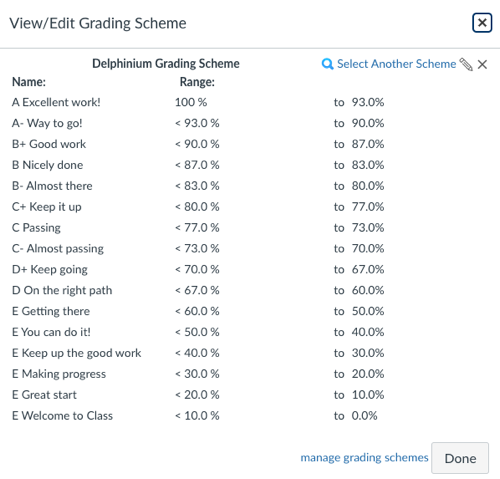
If you do edit the grading scheme for during the class, you will need to change it back to straight lettter grades at the end of the term to submit the grades to Banner.
Canvas provides the following tutorials for managing Canvas grading schemes:
- How do I add a grading scheme in a course? Opens External Page
- How do I enable a grading scheme for a course? Opens External Page
- How do I view grading schemes in a course? Opens External Page
Note: Due to a Canvas bug, Delphinium cannot read grading schemes created at the account level. You will need to create a grading scheme for each course, or use the default Delphinium grading scheme.
You will need to add a Total Points value in the Delphinium Settings for Delphinium to accurately translate the %-based grading scheme to a points-based grading scheme. See the follow for more details:
Reference
This content was copied from:
https://tutorials.delphi-me.com/deep_dive/set-up-a-course/canvas-settings