Utah State University sites use cookies. By continuing to use this site you accept our privacy and cookie policy.
Skip to content
  • Apply
  • Visit
  • Give
  • Calendar
  • A-Z Index
  • Directory
  • Libraries
  • QUICK LINKS
  • MyUSU
  • SEARCH
Utah State University logo
Teach

Search Utah State University:

I want to search
UState logo
Teach
  • Home
  • Help Topics
    Help Topics
    Delivery Methods
    • In-Person
    • Online
    • Virtual
    • Hybrid
    • Connect
    • Arranged
    Teaching Strategies
    • Course Management
    • Course Quality
    • Student Engagement
    • Assessments
    • Proctored Testing
    Teaching Software
    • Canvas
    • My Media (Kaltura)
    • Zoom
    • Atomic Assessments
    • Proctorio
    • iClicker
    • Wooclap
    • All Tools
    Classroom Technology
    • Classroom Quick Start
    • Classroom Touch Panel
    • Document Cameras
    • Microphones
    • All Classroom Resources
  • Workshops & Events
  • Resources
  • Contact Us
  • AI Chatbot
  • Search Site
  • Quick Links
    Quick Links
    • Apply
    • Visit
    • Give
    • Calendar
    • A-Z Index
    • Directory
    • Libraries
  • MyUSU
Atomic Assessments
  • Atomic Assessments Introduction
  • Atomic Assessments with Blueprint Courses
  • Add Assessment to a Content Page
  • Assessment Settings Overview
  • Copy Canvas Course that uses Atomic Assessments
  • Copy Assignment to Another Course
  • Create an Assessment
  • Create an Assessment from a Canvas Classic Quiz
  • Duplicate an Assignment
  • Duplicate an Item
  • Image Size Specifications
  • Outcomes
  • Proctored Exams
  • Rename an Activity
  • Recommended Learning Activities Settings
  • Setup in Canvas
  • Share Content with Another User
  • Troubleshooting: Stuck Scoring
  • Troubleshooting: Allow Student Review on Locked Assessments
  • Questions
    • Creating Question Items
    • Question Data Sets
    • Question Settings Overview
    • Question Types
  • Question Banks
  • Videos
    • Use Kaltura My Media Video
    • Use Videos in an Assessment

Troubleshoot Stuck Scoring in Atomic Assessments

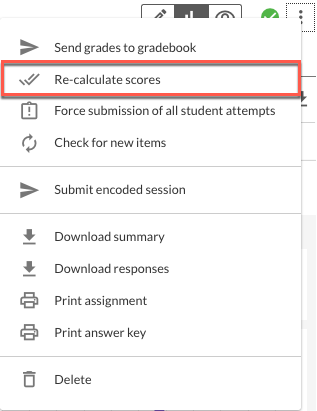
Occasionally the scoring gets stuck in an Atomic Assessment. In order to correct this issue, re-calculate the scores.

1

Click More Options (the three dot menu) in the assignment

Three dot menu highlighted.

 
2

Select Re-calculate scores

Re-calculate scores option highlighted.

TEACH

Support Contact Information

Center for Instructional Design and Innovation

  • 435.797.9506
  • cidi@usu.edu

Center for Empowering Teaching Excellence

  • 435.797.4950
  • empowerteaching@usu.edu

Classroom Support

M-TH: 8am-10:30pm;
F: 8am-6pm
435.797.4445
classrooms@usu.edu

Room Scheduling

435.797.2014
rooms@usu.edu

IT Service Desk

M-TH: 8am-8pm;
F: 8am-6pm;
Sat: 10am-3pm
435.797.4357
877.878.8325

Canvas Support - 24/7 Hotline

(Login required)

Registration

M-F: 8am-5pm
435.797.1116
registrar@usu.edu

Academic Testing Center

435.797.3617

  • Chat with CIDI
  • Schedule Consultation
  • USU Canvas Login
Utah State University
  • Maps & Directions
  • Search USU
  • Campus Safety
  • Jobs
  • Contact
  • Terms of Use
  • Copyright
  • Privacy
  • Accessibility
  • Non-Discrimination
  • Admin
Back to top of the page