
Question Types in Atomic Assessments
Atomic Assessments allows instructors to create quiz questions far beyond the scope of Canvas Quiz tools. This tutorial will go over the different types of quiz questions available in Atomic Assessments and their capability.
Access questions using the Authoring menu or when creating an activity or assignment (including quizzes and exams).
Some users have had problems with the Canvas mobile app not allowing for screen orientation rotation (from vertical to horizontal) which can be a problem if there are horizontal images or layouts. To fix this issue, they can change their settings to have external links open in a browser or launch Canvas from a browser OR avoid using a mobile device for the Atomic Assessment content.
Accessible Question Types
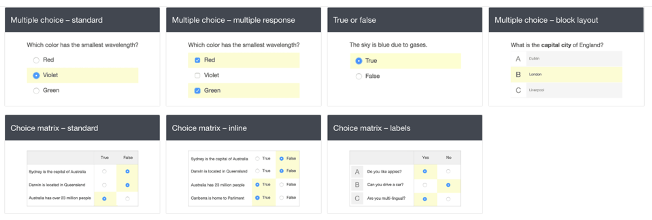
Multiple Choice
Traditional multiple choice, true/false, multiple response, and various grid matrices
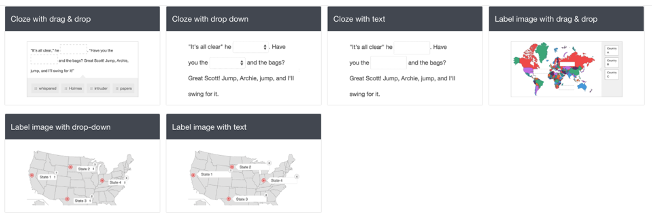
Fill in the Blank (Cloze)
Drag and drop, drop-down menu, and blank text box (These features can be incorporated into a passage of text or on top of an image.)
Classify, Match & Order
Sort or match subjects into different categories, order them into a list, or sort them into a target location

Written and Recorded
Essay question, short response, or audio response

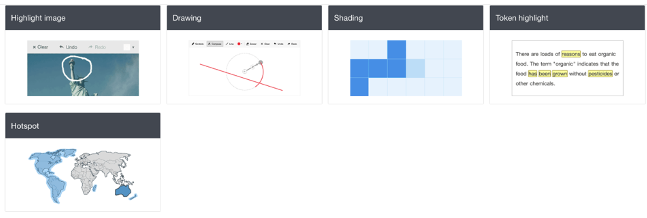
Highlight and Drawing
Circle a specific portion, shade in a grid, highlight words in a sentence, or select a section on an image
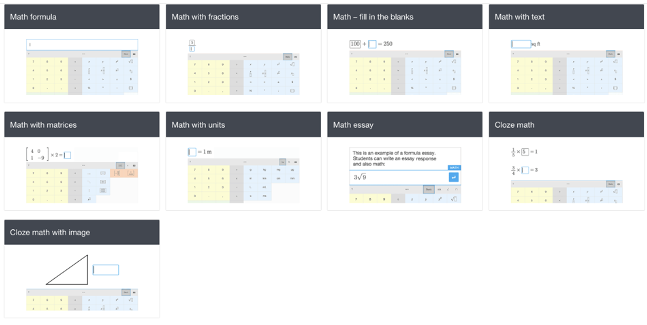
Math
Cloze options, fractions, formula, and matrices (Students can input complex math equations to answer questions by using the keyboard provided.)
Graphing
Plotting, drawing lines, and number lines

Chart
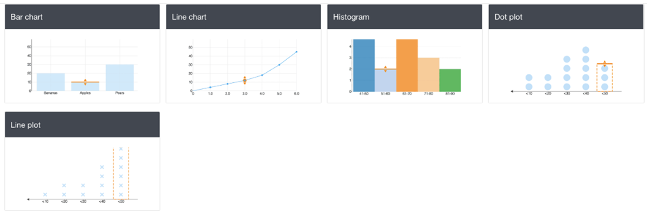
Dot and line plots, and several different types of charts (Students can fill in charts to record data or respond to questions.)
Chemistry
Special keyboard for students to answer questions using specific notation (Images can also be uploaded, with options for students to label different sections of a molecule.)

Other
File uploads, survey rating options, and image annotation

Inaccesible Question Types
There are a few question types that are not accessible for some students with disabilities. These include:
- Bar chart
- Line chart
- Histogram
- Dot plot
- Line plot
- Number line drag & drop
- Number line with plot
- Highlight image
We recommend avoiding these question types. If you do use any of these question types, you will need to work with the Disability Resource Center if a student requiring certain accommodations enrolls in your course.
Question Types Capability Compare Chart
The table below shows all of the different question types that you can utilize with Atomic Assessments, their functionality, as well as demonstrating the comparison between them and the capabilities of the Canvas Classic and New Quizzes.
| Question Type | Mobile Friendly | Accessible | Auto-Gradable | Canvas Classic Quizzes | Canvas New Quizzes |
|---|---|---|---|---|---|
| Multiple choice-multiple response | |||||
| Multiple choice-block layout | |||||
| True or false | |||||
| Choice matrix–standard | |||||
| Choice matrix–inline | |||||
| Choice matrix–labels | |||||
| Cloze with drag & drop | |||||
| Cloze with drop down | |||||
| Cloze with text | |||||
| Label image with drag & drop | * | ||||
| Label image with drop-down | * | ||||
| Label image with text | * | ||||
| Classification | |||||
| Match list | |||||
| Order list | |||||
| Sort list | |||||
| Essay with rich text | |||||
| Essay with plain text | |||||
| Short text | |||||
| Audio recorder | |||||
| Highlight image | * | ||||
| Drawing | * | ||||
| Shading | * | ||||
| Token highlight | |||||
| Hotspot | |||||
| Math formula | ± | ± | |||
| Math with fractions | ± | ± | |||
| Math–fill in the blanks | ± | ||||
| Math with text | ± | ± | |||
| Math with matrices | |||||
| Math with units | |||||
| Math essay | ± | ± | |||
| Cloze math | |||||
| Cloze math with image | |||||
| Graphing | - | ||||
| Graphing in 1st quadrant | |||||
| Number line with drag & drop | * | ||||
| Number line with plot | |||||
| Bar chart | |||||
| Line chart | |||||
| Histogram | |||||
| Line plot | |||||
| Dot plot | |||||
| Chemistry formula | |||||
| Cloze chemistry | |||||
| Chemistry essay | ± | ± | |||
| Cloze chemistry with image | |||||
| File upload | |||||
| Image annotation upload | ± | ± | |||
| Rating | |||||
| Gridded |
* functionality of this feature depends upon how question is created