
Media at USU
We recommend using My Media (Kaltura) to record, upload, and organize your videos in Canvas. Once you have media in My Media you can then publish to the course media gallery or embed it directly on a Canvas page. If you are using Zoom to hold class, you will need to record your lecture via Zoom instead of Kaltura. The two programs cannot run at the same time. (If desired, you may email your A number to chris.clement@usu.edu to request that your Zoom cloud recordings be automatically transferred to your My Media account after they have been completed and processed. You will still be able to record Zoom meetings to your local computer if you don't want them to go to your My Media account, but all cloud recordings will go to My Media after you opt in.)
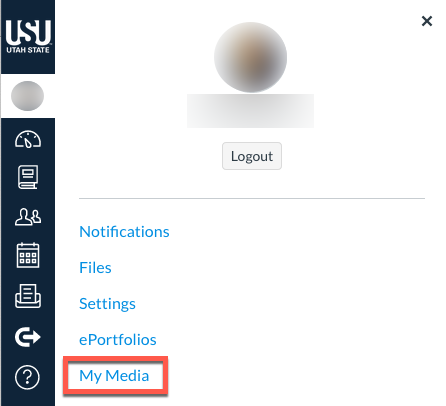
Open My Media
Log on to your Canvas account
On the Canvas dashboard, click Account
Select My Media
Record or Upload Media from Any Location
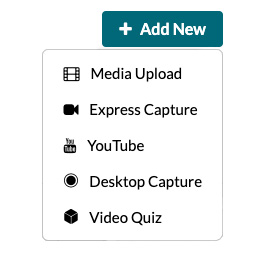
Kaltura has a variety of tools that can help you record any type of video no matter where you are. Below is a list of sources that you can choose:
-
Media Upload - Upload a video taken with any device to your My Media account.
-
Express Capture - In-browser recording tool that only records your camera and microphone.
-
YouTube - Ability to add a public YouTube video to your My Media account with the video page link.
-
Desktop Capture - Recording tool that can record up to two video sources such as your computer screen and camera, as well as your microphone. Additional software must be downloaded to make recordings.
-
Video Quiz - Creates an in-video quiz from a video that already appears in your My Media repository.
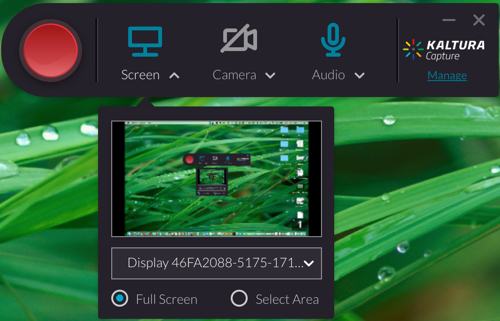
 Record Your Desktop Screen and Computer Camera
Kaltura Capture is an available software for everyone with a My Media account. This tool allows you to record up to two video sources such as your computer screen and camera along with your microphone. This is the suggested tool to use when recording a presentation on your computer.
 Record a Video in a USU Classroom with Kaltura Classroom
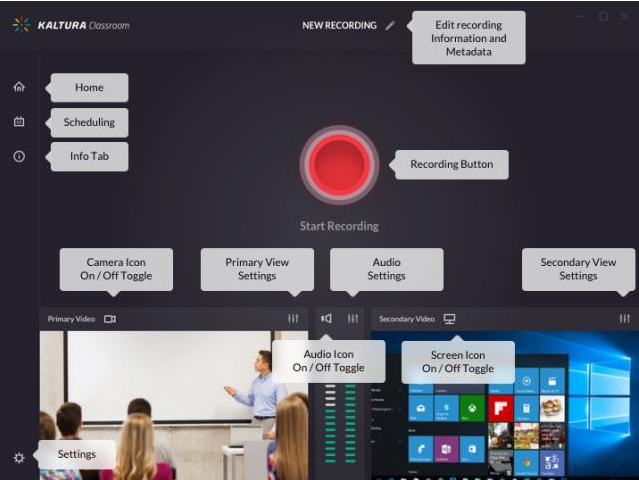
Classroom Capture is a software on select classroom instructor computers that allows faculty to record and publish regular class lectures.
Record a Lecture in the Academic Media Production Studios
You can record a desktop capture with audio in the Audio Studio (Logan, DE 101) Open External Link . Or, a media team member will record you with or without desktop capture in the Video Studio (Logan, DE 101) Open External Link . Media recorded in either studio will be uploaded to your MyMedia account so that you can publish or embed it, as you see fit.
Embed and/or Publish
My Media is directly integrated with your Canvas account, which means that all of the media found in your repository can easily be embedded to any of your Canvas courses.
Additionally, Canvas has a tool that can be enabled called the Media Gallery. This tool allows you to publish specific videos within your repository so that students can view all relevant course videos on one page. (This can be helpful if students are trying to review a specific topic.) Using the Media Gallery makes it so that you can see viewing data for your videos.
Student Interaction
Kaltura has a several ways for your students to view the media that you provide. You may want to provide the link to the Kaltura Viewing Tips to students to help them know about these various viewing options.
You can also direct your students to these guides to submit a video as an assignment or as part of an announcement.